
A more considered way to make PDFs
Explore Folio’s PDF cover designer: starter layouts, headings, shapes, colour gradients, images and back-cover designs for your Mac booklet.
Folio brings organising, cover design and previewing into one straightforward workflow on the Mac.
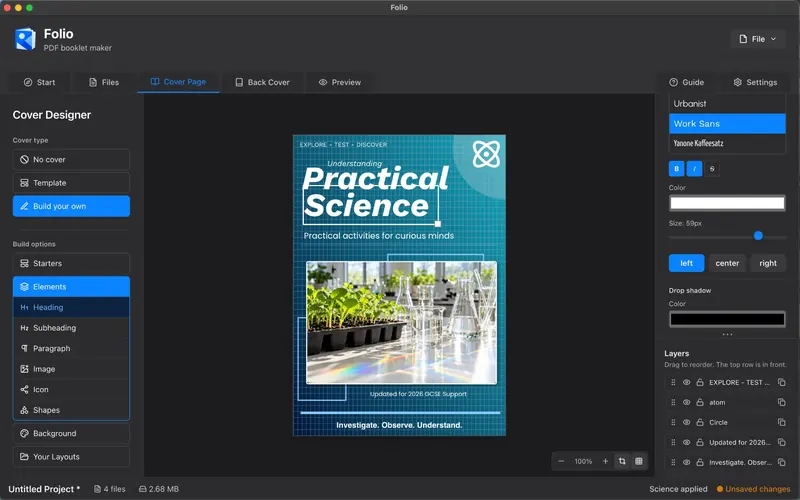
Step-by-step
Choose a suitable layout
Start with a design appropriate for your material: a bold cover for a children’s story, a calm photographic treatment for travel, or a structured layout for a business guide.
Establish a clear hierarchy
Make the main title easy to read first, then add a subtitle or supporting detail. Avoid filling the entire page with text.
Set the background
Choose a solid colour, palette, gradient or image. Check that text stays readable over the chosen background.
Add and arrange elements
Use headings, paragraphs, decorative shapes, icons and images. Adjust position and scale so that each element supports the overall composition.
Design the back cover separately
Use the same visual language but a different layout. A short description, author information or contact detail often suits a back cover better than another large title.
Check the final preview
Review the front cover, contents and back cover as a complete booklet before exporting the PDF.
Common questions
Do I need design experience?
No. Folio includes starter layouts, while the Build Your Own tools let you customise the result further.
Can the front and back covers look different?
Yes. Use matching colours and typography for consistency while tailoring the content of each cover to its purpose.
Ready to put your pages together?
Try the Folio workflow before you buy. UK price: £3.99, one-time purchase. The Mac App Store listing has been submitted for review.