
A more considered way to make PDFs
A practical step-by-step guide to making a PDF booklet: combine documents, arrange chapters, add covers, create contents and export using Folio.
Folio brings organising, cover design and previewing into one straightforward workflow on the Mac.
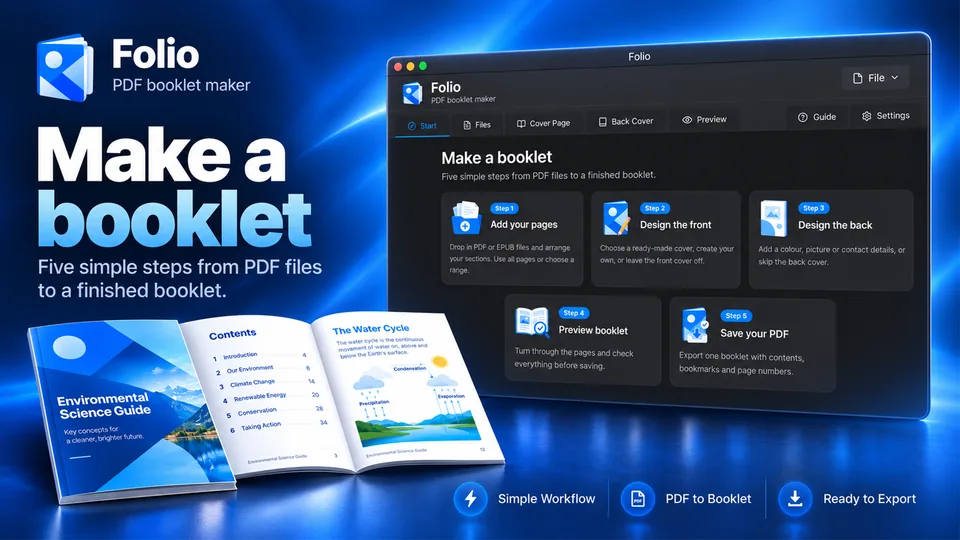
Step-by-step
Collect the material
Gather the PDF chapters, reports, scanned pages or other documents you want in your booklet. If you also have EPUB content, Folio supports adding it to the project.
Arrange the reading order
Import your files into Folio, set section titles and move each document into the intended order. Choose page ranges where you only need part of a source file.
Create a front and back cover
Choose a starting design or build your own. Use a clear title, readable typography and imagery that reflects the subject. A back cover can add a useful summary.
Review the contents and pages
Generate a preview, check the table of contents, review chapter boundaries and page numbers, and look for rotated or misplaced pages.
Export the final PDF
Open the export controls, select the elements to include and choose a compression setting suited to how you plan to share the booklet.
Common questions
Is a PDF booklet different from merging PDFs?
A merged PDF combines files in sequence. A booklet adds publishing details such as covers, section titles, a table of contents and navigation.
Can I use Folio for different types of booklets?
Yes. Examples include portfolios, training material, stories, research packs and travel collections.
Ready to put your pages together?
Try the Folio workflow before you buy. UK price: £3.99, one-time purchase. The Mac App Store listing has been submitted for review.