
A more considered way to make PDFs
Learn how to combine multiple PDFs, reorder sections, select pages and turn separate documents into one polished PDF booklet using Folio for Mac.
Folio brings organising, cover design and previewing into one straightforward workflow on the Mac.
Step-by-step
Decide on the final order
Write a short running order for the complete document, including introductions, chapters, appendices and any supplementary pages.
Import separate documents
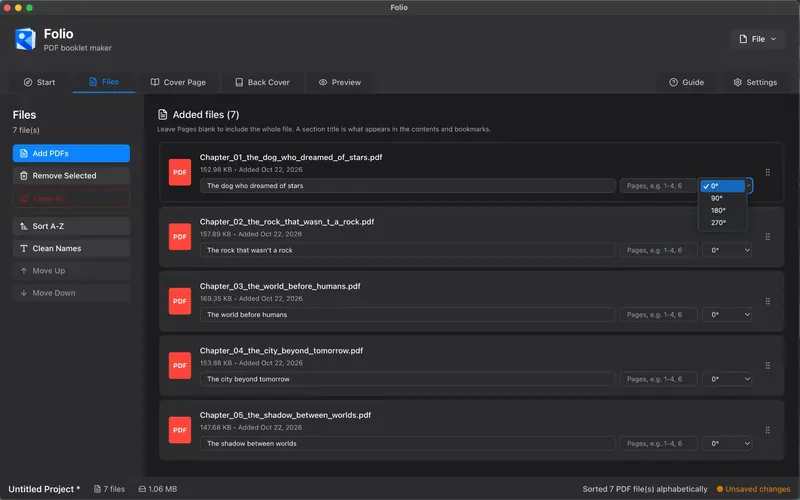
Add your PDF files to Folio’s Files workspace. Keep related pages together and give sections descriptive titles.
Reorder and select pages
Move source files up or down, pick a page range if needed, and correct page rotation before previewing.
Add booklet navigation
Include a table of contents and bookmarks when they are useful. A long guide becomes much easier to use when readers can jump directly to sections.
Preview the combined document
Review the result as one booklet. Check the transition between source PDFs and the final page numbering before exporting.
Common questions
Will my source PDFs be replaced?
Folio assembles a new output document; check your selected export destination and retain your original source files.
Can I include only selected pages?
The Files workspace includes page-range controls so you can choose which pages from a source document are used.
Ready to put your pages together?
Try the Folio workflow before you buy. UK price: £3.99, one-time purchase. The Mac App Store listing has been submitted for review.