FOLIO · PDF BOOKLET MAKER

From your PDFs.
To something brilliant.

Bring your pages together. Create beautiful covers. Preview every detail and export a polished booklet — all in one simple workflow.

Available for macOS · Windows version planned

A better way to bring it all together

Less juggling. More creating.

01 / ImportBring all your PDFs into one project
02 / CreateMake it yours with covers and layouts
03 / ShareExport a polished, organised PDF
01 — Your files, your way

From many files.
To one story.

Bring your documents into one clean workspace. Rearrange the order, tidy the titles, rotate pages and decide exactly what goes into the final booklet.

  • Import PDF and EPUB documents
  • Reorder, rename and organise your chapters
  • Select page ranges and rotate pages
  • Keep your book's structure in one place
Folio file workspace showing added chapters, page ranges and rotation controls
Everything, beautifully organised ✓
02 — The creative part

Make a cover
that's all yours.

Start with a thoughtfully designed layout or build a cover from scratch. Blend colours, drop in images, add shapes and icons, then fine-tune every detail.

  • Starter layouts to make getting started easy
  • Background images, colours and gradients
  • Editable text, shapes, icons and layers
  • Save your layouts for another project
Folio cover designer with editable typography and cover layout tools
Your style. Your cover. ✦
A blank canvas. Endless possibilities.

Made for what you make.

Travel journals, children's stories, guides, portfolios or something entirely new. Folio is ready for your next idea.

Colourful children's space story cover

Children's stories

Bring words, artwork and chapters into a charming keepsake.

Family holidays cover layout

Travel & memories

Turn photographs, notes and guides into a beautiful collection.

Weather-themed cover layout

Guides & education

Give learning materials, reports and handbooks a polished finish.

A simple creative journey

From first file
to finished booklet.

Scroll through the five stages of Folio. Everything you need, in one natural workflow.

Folio Files workspace
STEP 01

Bring it all in.

Gather PDFs, set the right order and give your chapters meaningful titles.

STEP 02

Make a first impression.

Choose a starter design or create a front cover that's entirely your own.

STEP 03

Finish every detail.

Use the same creative tools to design a complementary back cover.

STEP 04

See it come together.

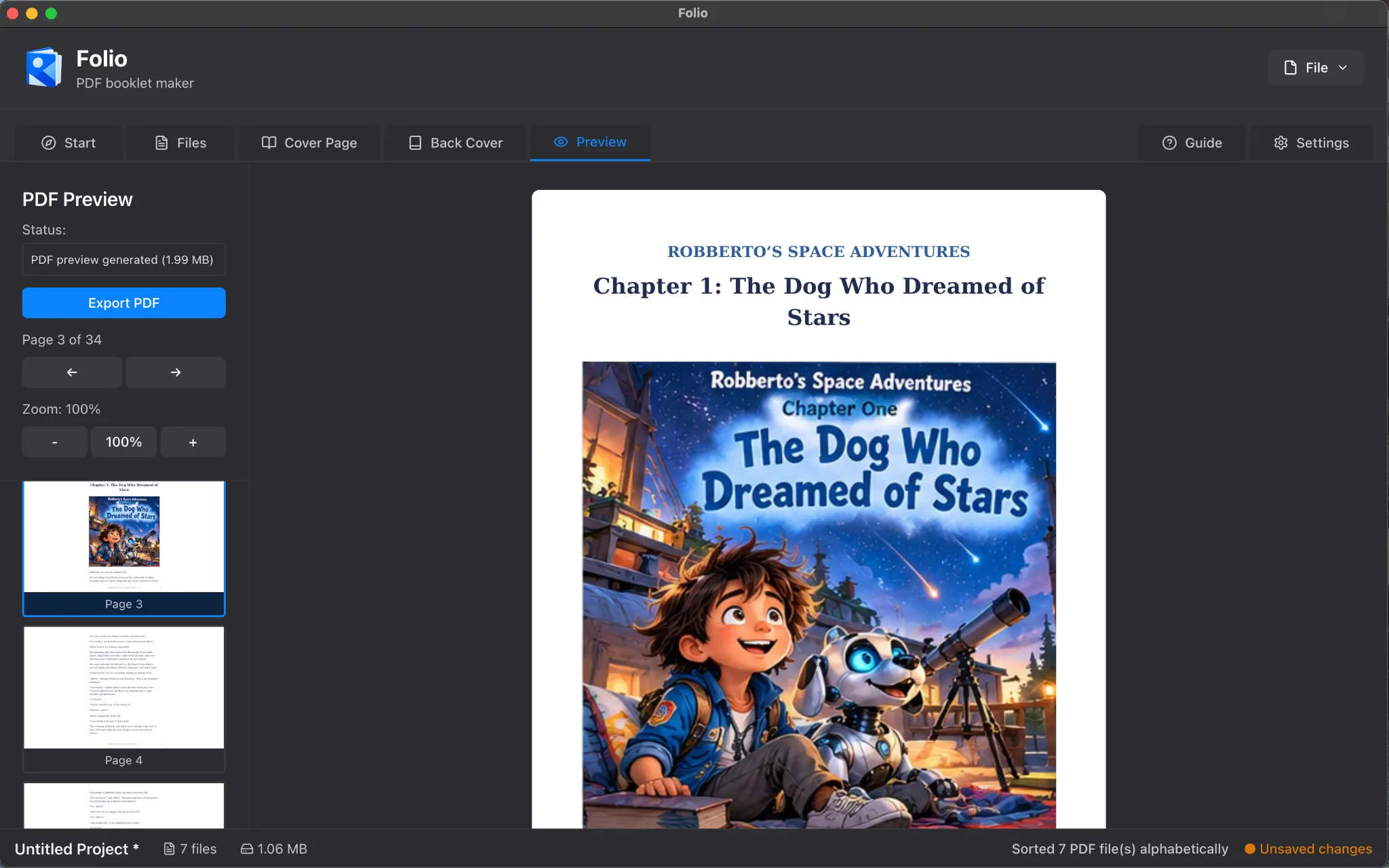
Flip through your booklet, check the order and explore the generated table of contents.

STEP 05

Ready for the world.

Choose page numbers, contents, covers and PDF compression before exporting.
03 — The finishing touch

A little polish.
A big difference.

It's not just about combining pages. It's about creating something that feels deliberate, finished and easy to navigate.

  • Automatic, clickable table of contents
  • PDF preview and easy page navigation
  • Optional page numbering and footer text
  • Flexible export and compression settings
Folio PDF preview showing a finished booklet
Preview before you publish ↗
Don't just take our word for it

Try Folio.
Right now.

Explore a hands-on tour of the workflow — add sample files, experiment with cover designs and see how a finished booklet comes together.

The demo is a product simulation and doesn't process real PDFs.

Folio cover layout gallery seen in the interactive demo
One tool. So many uses.

What will you create?

📚

Storybooks

Combine illustrated chapters into a story worth keeping.

🏝️

Holiday memories

Collect the highlights of every trip in one beautifully designed PDF.

🎓

Teaching materials

Bring worksheets, activities and educational guides together.

💼

Business documents

Present reports, proposals and portfolios more professionally.

Simple, transparent pricing

Everything you need.
One simple price.

Bring your PDFs together, create custom covers and export finished booklets with Folio.

FolioPDF booklet maker
£3.99

UK price · One-time purchase

  • Combine and organise PDFs and EPUBs
  • Design front and back covers
  • Choose or customise starter layouts
  • Clickable table of contents, page numbers and bookmarks
  • Preview and export finished PDF booklets
Choose your store ↗

Store links will be enabled when listings are published.

Your next great booklet starts here

Make something
worth sharing.

Folio is £3.99 in the UK. Choose your preferred store; download links will be enabled when the official listings are published.

Mac App Store

Get the native macOS app through Apple's App Store once its listing goes live.

Link coming soon

Microsoft Store

For Windows users — a dedicated store destination is reserved for the future release.

Planned · link coming soon

Direct purchase

A direct purchase option can appear here if you also make Folio available outside the stores.

Link to be confirmed

Store names and marks are used for identification only. Buttons will be activated when official purchase links are supplied.

Good to know

A few quick
answers.

Everything you need to know before getting started.

What can I make with Folio?

Folio is designed to assemble PDF booklets, reports, portfolios, guides, storybooks and collections of documents with editable front and back covers.

Can I change the order of my files?

Yes. Arrange your imported documents into the order you want, update their titles and choose which pages should appear in the booklet.

Does Folio create a table of contents?

Yes. Folio can automatically add a clickable table of contents and can include optional page numbers and footer text.

Can I save cover designs for reuse?

Yes. The cover designer lets you work from starter layouts, customise them and save your own layouts for future projects.

Where can I download Folio?

Folio is priced at £3.99 in the UK. Official Mac App Store, Microsoft Store and direct-purchase destinations will be linked here when available. You can explore the interactive demo now.

Create without the complications

Your next booklet
begins with Folio.

Beautifully simple. Surprisingly capable. Made to bring it all together.

Explore download options ↗